
 Marketing automation for publishers
  Automate recruitment communication
  Keep customers informed automatically through transactional email
  Deliver more relevant communication with personalized emails
  Create engaging emails with ease
  Make sure your emails reach the inbox with reliable deliverability
  Send at scale without limits
  Keep your customer data secure in Europe
  Reach customers at the right moment with automated communication
  Create seamless customer journeys that convert
  Turn customer data into actionable campaigns
  Combine SMS and email for greater impact
  Turn website visitors into customers
  Make every customer interaction more relevant with personalization
  Email editor
 Push notifications
 Layered database
 Testing mailings
 REST API/Webhooks
 Website crawler
 Coupons
 GDPR compliancy
 Web based dashboard
 Advanced queuing
 Large volumes of email
 Full control and logging
 White papers
 Documentation
 Trainings
 Need more help?
 Our team
New dashboard in Copernica Marketing Suite
by Chloë van der Woude
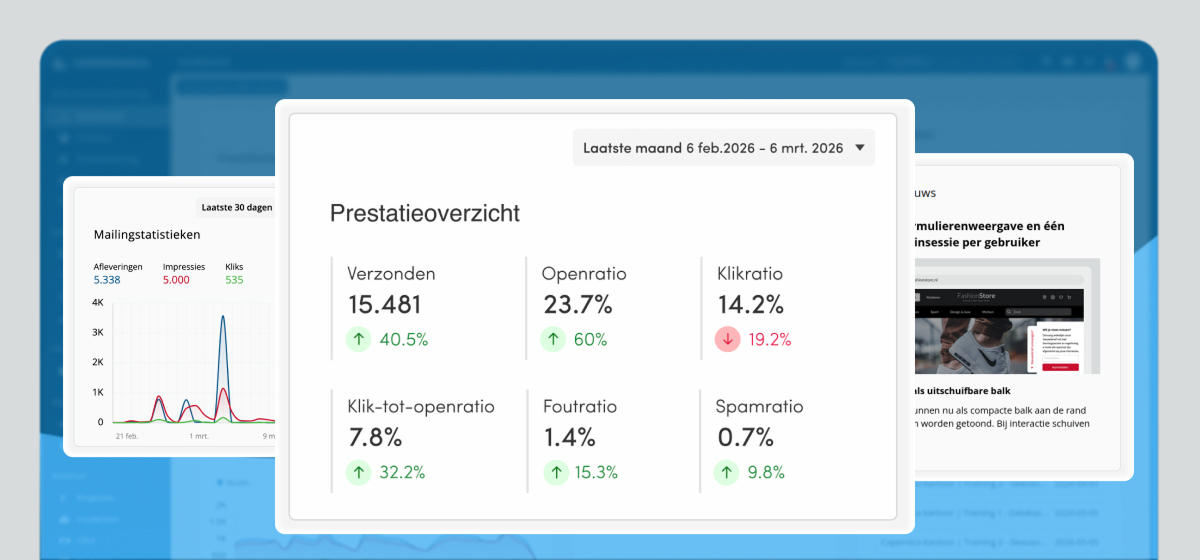
We have updated the dashboard in Marketing Suite. There are now two dashboards available: an informational dashboard and a dashboard to help you get started quickly with your account.
Informational dashboard
The default dashboard provides an overview of the most important information in your account.
Here you can see, among other things:
- a performance overview of your mailings for a selected period, including a comparison with the previous period
- the latest news
- open support tickets and notifications
This gives you immediate insight into the performance and activity within your account.
Get started with your account
The second dashboard helps you get your account ready for use quickly. This dashboard is especially useful if you have just started using Copernica or if you have not yet configured all its features.
Here you will find:
- required tasks to prepare your account for sending mailings
- recommended tasks to help you get more out of your account
These first steps will help you get your account ready for use.
Switching between dashboards
You can easily switch between the two dashboards using the button in the top-left corner of the menu.
We're here to help
Do you have any questions or suggestions about the new changes, or are there things you regularly run into? Feel free to contact our support team.